
Appearance
Activity Metadata Check
Where to find it: Reports button → NeoDash → "Activity Metadata Check" in the Report navigation panel.
Purpose
A dashboard for users who maintain the definition of activities and activity instances in the Study Builder Library. It checks whether activity instances have the required items and whether activities/instances are assigned to valid groupings.
Concept & definitions
- Missing mandatory items — required items absent from an activity instance, per the Activity Instance Class model.
- Grouping — the group/subgroup relationship that links activities and their instances; the report flags missing or invalid groupings.
When to use
Use when curating the activity library, to find activity instances with missing mandatory items or activities lacking valid groupings.
Report tabs
The report is organised in different tabs, each supporting a different purpose. To open the report, see Open NeoDash on the section landing page.

Some of the tabs go in pairs, indicated by the yellow underline in the Tabs in report.
| Tab | Use it to… |
|---|---|
| ReadMe | Get oriented — a short summary of the report's scope and functionality. Start here. |
| Search bottom-up | Browse groupings of activities and activity instances from the bottom up. |
| List of Missing Activity Items for Activity Instances | Filter top-down and list activity instances that have missing mandatory items. |
| Grouping Check | Check the status of activity groupings and spot outdated activity/instance versions. |
| Display missing groupings | Review counts of activities and instances with and without valid groupings. |
ReadMe
Purpose: Gives a short summary of the report's scope and functionality.
When to use: Start here to get oriented before moving to the other tabs.
Show Quick Guide
- Open the ReadMe tab.
- Read the summary of the report's scope before moving to the other tabs.
The two main things this dashboard focuses on are:
- to check if an activity instance has the required items
- to check if the activities and activity instances are assigned to valid groupings
Provides a short summary of the report's scope and functionality.
Search bottom-up
Purpose: Displays groupings of activities and activity instances from the bottom up.
When to use: Use when you want to browse activity groupings by starting from an activity or instance rather than a top-down search.
Show Quick Guide
- Open the Search bottom-up tab.
- Search for activities to view the groupings of activities and activity instances.
This tab has been included for general display of groupings of activities and activity instances. Please see Activity Lib (search bottom-up) for how that panel works.
List of Missing Activity Items for Activity Instances
Purpose: Lists activity instances that are missing mandatory items, filtered by a top-down search.
When to use: Use when you need to find and narrow down which activity instances have missing mandatory items.
Show Quick Guide
- Make a top-down search to limit the activities shown.
- Review the listed activity instances that have missing mandatory items.
- Use the full-path view to see missing items from other classes than the immediate parent.
The tabs Activity Lib (search top-down) and the List of Missing Mandatory Items for Instances go hand in hand.
Search top-down
To limit the number of activities shown in the List of Missing Mandatory Items for Instances the user can make a top-down search. Please see Activity Lib (search top-down) for how that panel works.
Display missing items
On the List of Missing Mandatory Items for Instances tab a list of Activities that has missing mandatory items are displayed.
Having made the following filter on the Activity Lib (search top-down) tab — Activity Class (A), Activity Subclass (B), Activity Group (C), Activity Subgroup (D)

will display the filtered list of activity instances having missing mandatory items, in Results (A):
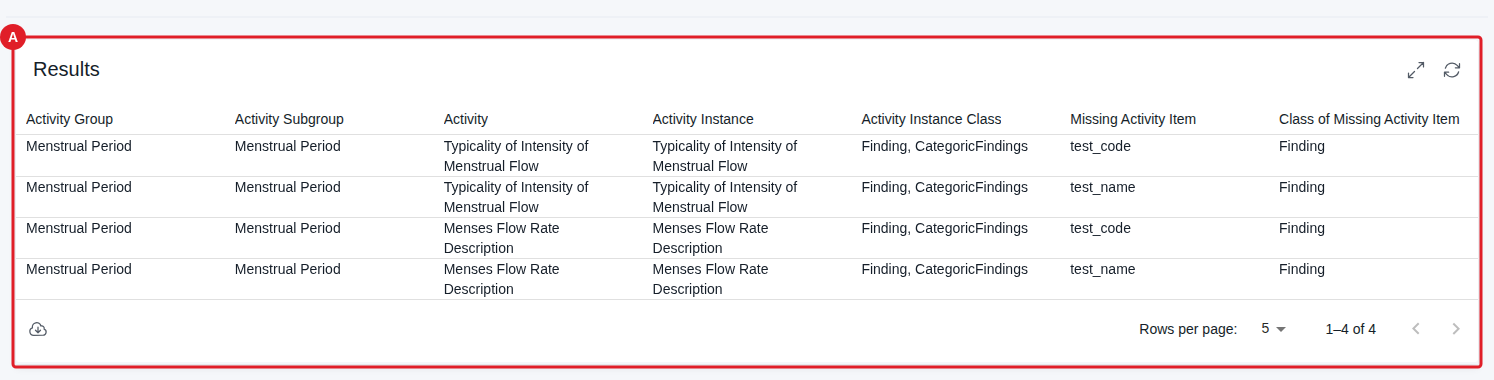
Note: The data displayed depends on the database content.
Full Path of Missing Items
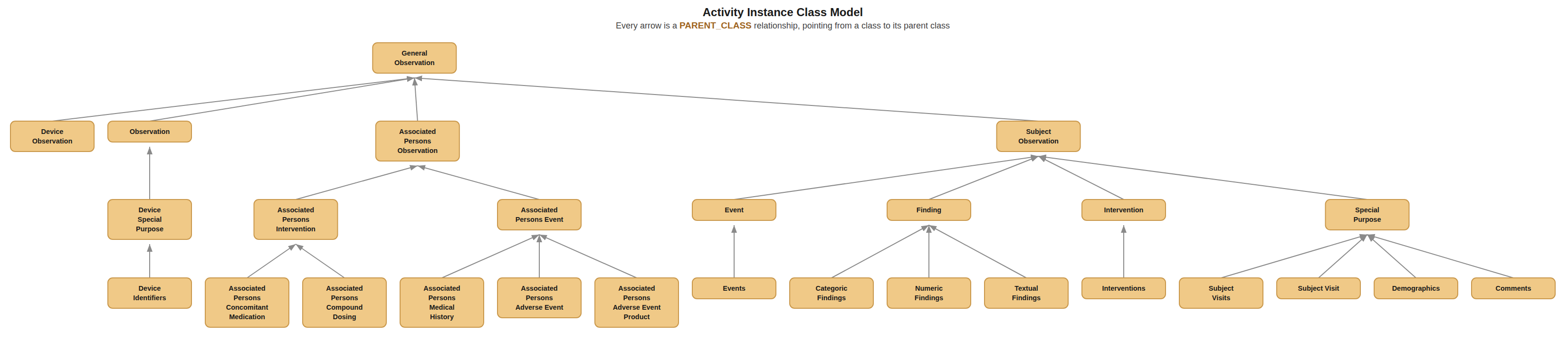
The instances and their items follow a Activity Instance Class model, see Class Model
In this tab, activity instances with missing items belonging to other classes than the immediate parent are added in listing of missing item. For the filter example above:
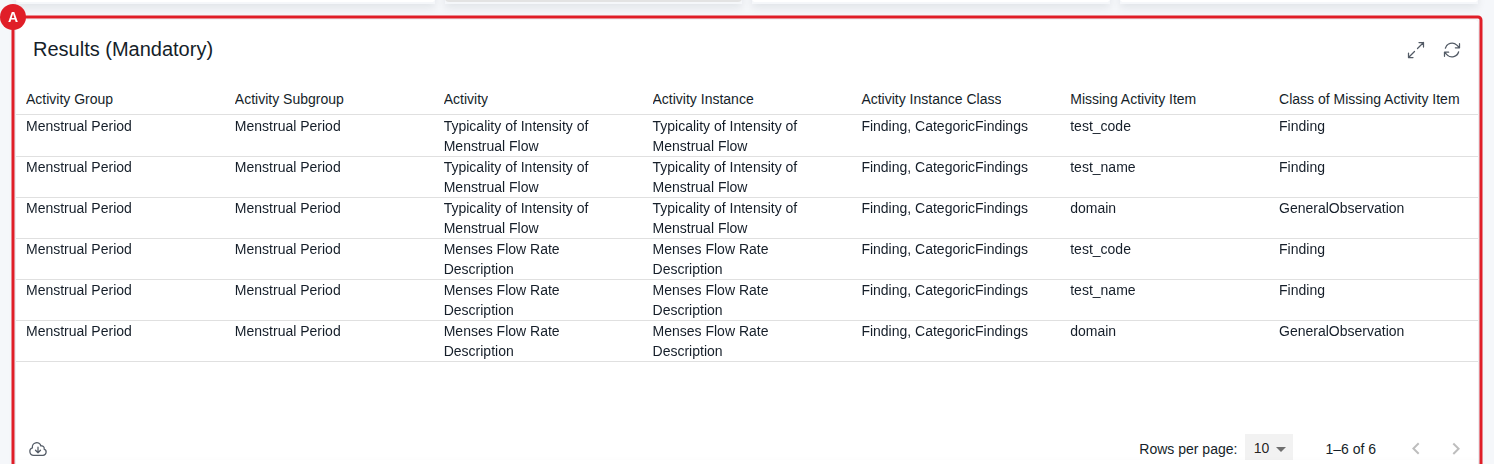
Note that this tab has filter buttons. These are prefilled with values from the Activity Lib (search top-down) tab, but can be changed on this page as well.
Grouping Check
Purpose: Shows the status of activity groupings, including counts and outdated activity/instance version mismatches.
When to use: Use when you need to check whether activities have a grouping assigned and spot outdated version mismatches.
Show Quick Guide
- Open the Grouping Check tab.
- Review the top part for activities without a grouping assigned.
- Review the bottom part for grouping counts and outdated activity instances.
This tab provides status of activities groupings. The top part displays any activities that do not have a grouping assigned.
The bottom part shows, for an activity selected on the Activity Lib (search bottom-up) tab, its activity/activity instance groupings and their instance count in Activities and their Activity Instances (A), and flags outdated activity/instance version mismatches in Outdated Activities (B) and Activities with Outdated Activity Instances Only (C):
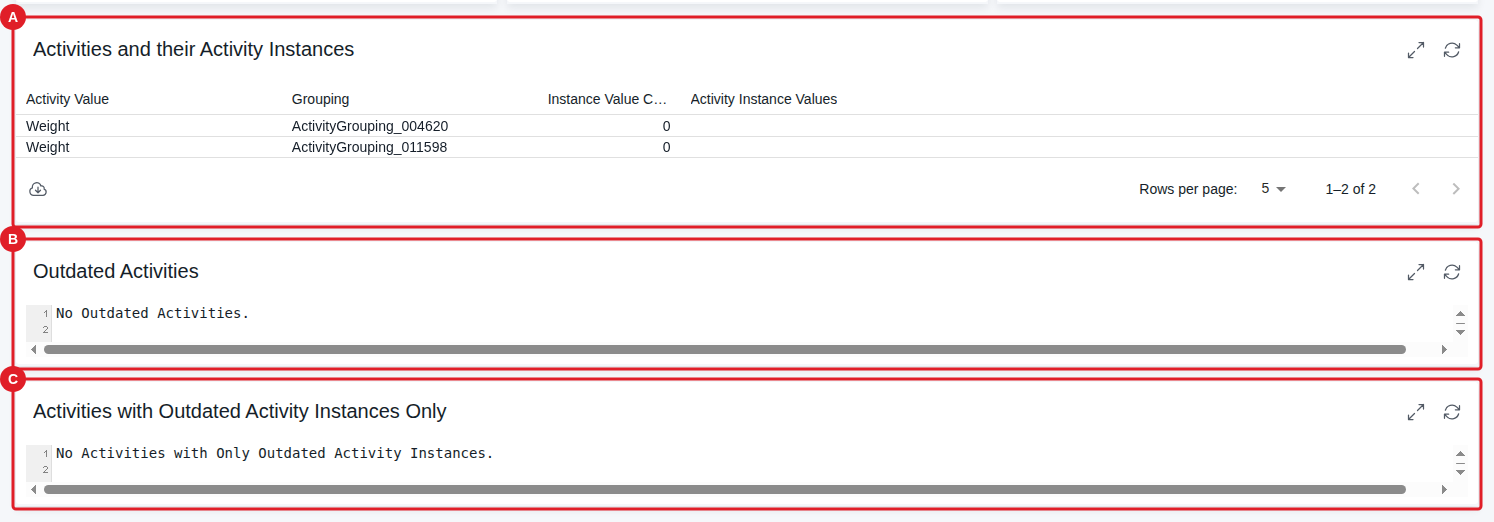
Outdated Activities (B) lists activities that have no latest version but still have an activity instance with a latest version related to them.
Activities with Outdated Activity Instances Only (C) lists activities that are themselves latest, but have no activity instance with a latest version related to them — i.e. all of their related activity instances are outdated.
Note: The data displayed depends on the database content — the example above shows no outdated activities/instances currently in the database.
Display missing groupings
Purpose: Displays counts of activities and activity instances with and without valid groupings.
When to use: Use when you need an overview of how many activities and instances still lack a valid grouping.
Show Quick Guide
- Open the Display missing groupings tab.
- Review the different counts of activity instances with and without valid groupings.
The activities and their instances are related via a grouping:
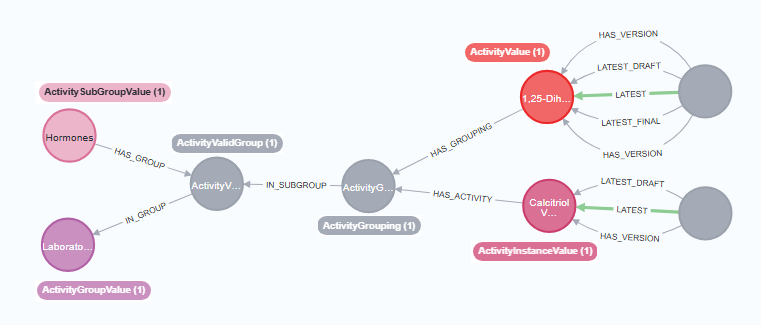
This tab displays three counts for activity instances: the total with a [:LATEST] relationship in Activity Instances with [:LATEST] Relationship (A), how many of those latest instances have a grouping assigned in [:LATEST] Activity Instances with a Grouping (B), and how many have a grouping that is valid — meeting all of the above conditions — in [:LATEST] Activity Instances with All Conditions Met (C):
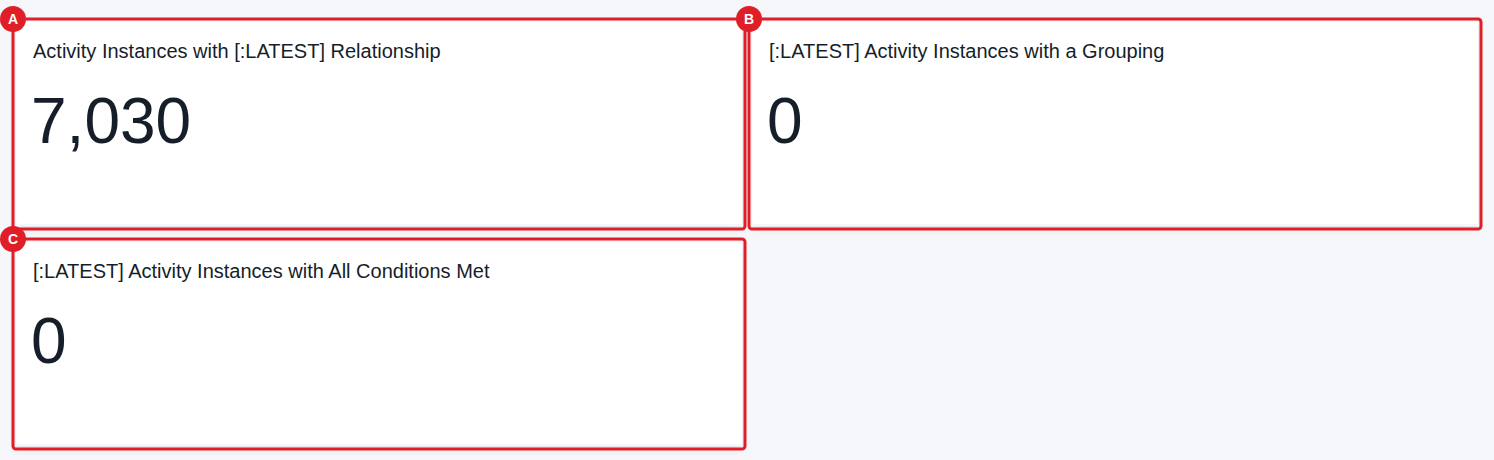
Note: The data displayed depends on the database content — the example above shows that most latest activity instances currently lack a grouping.
Show Solution Architecture
Instances and their items follow an Activity Instance Class model (see the class model image above). The check walks the grouping relationships between activities and activity instances; it surfaces activities with no grouping, instances missing a valid group, and outdated activity/instance version mismatches.
Common errors
| Symptom | Interpretation | Likely cause | Fix |
|---|---|---|---|
| The missing-items list is empty or unexpected | Could be a filter effect, not necessarily zero results | The displayed data depends on database content and the top-down filter | Adjust the Search top-down filter; confirm database content |
| An activity shows as outdated | A flag, not an error — the report is designed to surface this | Activity has no latest version but a latest-version instance is related to it | Review the activity's versioning; the report flags the mismatch for you to resolve |
If this does not resolve the issue, contact your OpenStudyBuilder administrator.