Appearance
CRF Impact Analysis
Where to find it: Reports button → NeoDash → "CRF Impact Analysis" in the Report navigation panel.
Purpose
Shows what else in the CRF library depends on a selected Item, ItemGroup, or Form, so you can see the ripple effect of a change before making it — for example, selecting an Item shows every ItemGroup, Form, and Collection that would be affected if that Item changed.
Concept & definitions
- Collection / Form / ItemGroup / Item — the CRF library containment hierarchy: a Collection contains Forms, a Form contains ItemGroups, and an ItemGroup contains Items.
- Impact — every ItemGroup, Form, or Collection that references the element you selected, together with an Impact Summary listing how many dependents were found at each level. On the Item Impact tab this summary also states an overall impact level (Low, Medium, or High).
- Dependency chain — the full path from the selected element through the ItemGroup and Form to the Collection that ultimately uses it (Item → ItemGroup → Form → Collection).
When to use
Use before updating an Item, ItemGroup, or Form definition, to see everywhere it is used further up the CRF hierarchy and how many things it contains — so you can assess the impact of a change before making it.
Report tabs
The report is organised in different tabs, each supporting a different purpose. To open the report, see Open NeoDash on the section landing page.
| Tab | Use it to… |
|---|---|
| ReadMe | Get oriented before assessing impact. Start here. |
| Item Impact | Select an Item and version to see the ItemGroups, Forms, and Collections that use it, plus the full dependency chain. |
| ItemGroup Impact | Select an ItemGroup and version to see the Items it contains and the Forms and Collections that use it. |
| Form Impact | Select a Form and version to see the ItemGroups and Items it contains and the Collections that use it. |
ReadMe
Purpose: Introduces the report and summarises what each tab covers.
When to use: Start here before performing an impact assessment, to get oriented on the report's tabs.
Show Quick Guide
The ReadMe tab introduces the report and its tabs. Besides the ReadMe tab the report holds the following tabs:
- Item Impact tab — select an Item and version to see all ItemGroups that reference it, all Forms that contain those ItemGroups, the Collections where those Forms are used, and the full dependency chain.
- ItemGroup Impact tab — select an ItemGroup and version to see all Items that are part of it, all Forms that reference it, and the Collections where those Forms are used.
- Form Impact tab — select a Form and version to see all ItemGroups that are part of it, all Items within those ItemGroups, and the Collections where the Form is used.
Item Impact
Purpose: Shows every ItemGroup, Form, and Collection that uses a selected Item, the full dependency chain, and a computed impact summary.
When to use: Use before updating an Item's definition, to see which ItemGroups, Forms, and Collections would be affected.
Show Quick Guide
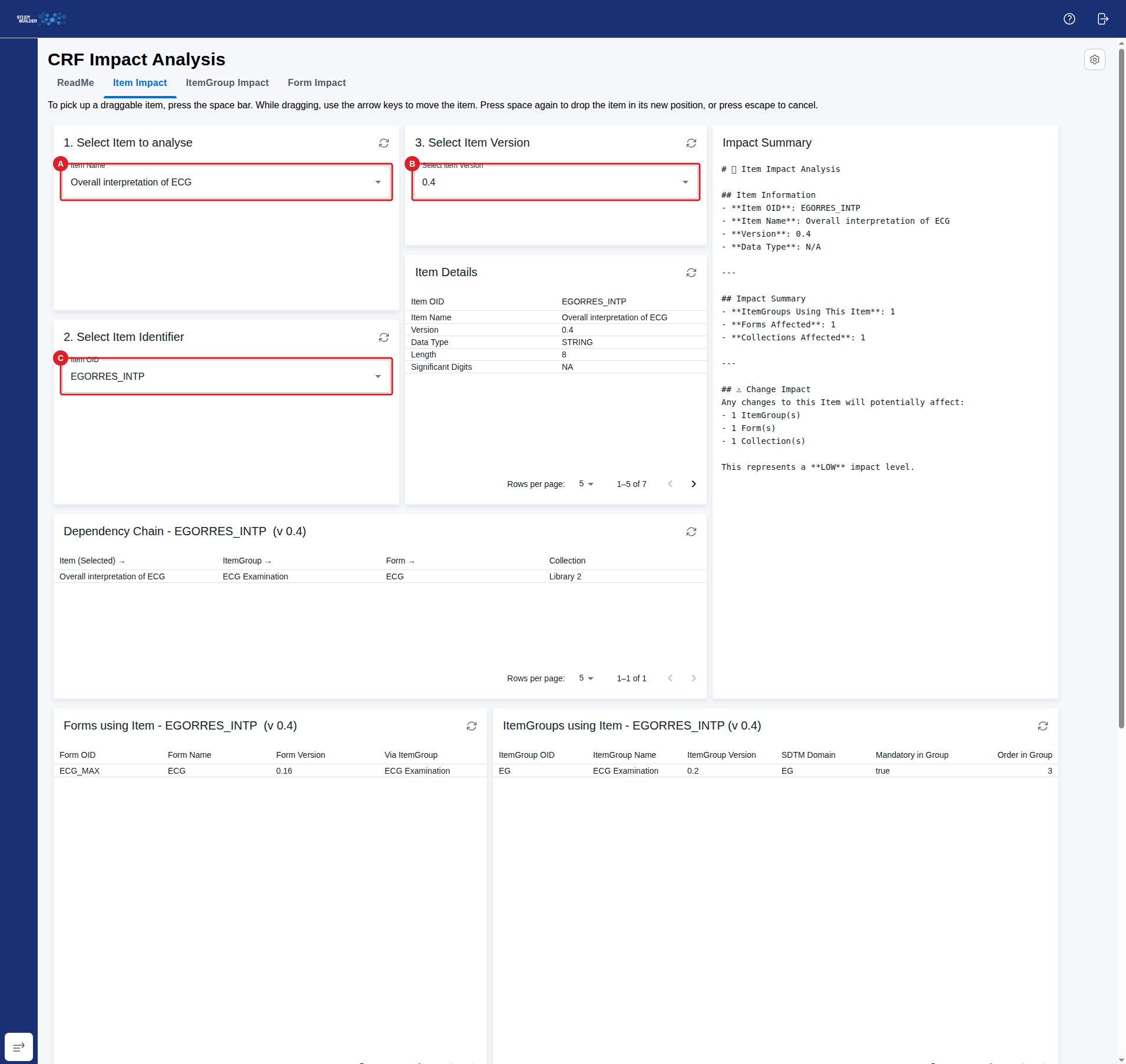
- Select an Item (name) from the Select an Item to analyse dropdown (A).
- Since an Item can be defined with the same name, then Select Item Identifier (C) to get the identifier (OID) of the Item to assess
- Select the Item Version (B) to analyse.
- Review the Item Details card for the Item's own properties (for example name, data type, and length).
- Review the ItemGroups using Item card displaying every ItemGroup that references the Item.
- Review the Forms using Item card displaying every Form that contains those ItemGroups.
- Review the Collections using Item card displaying every Collection where those Forms are used.
- Review the Dependency Chain card, which lays out the full path from Collection through Form and ItemGroup to the selected Item.
- Review the Impact Summary card for a count of affected ItemGroups, Forms, and Collections, and an overall impact level (Low, Medium, or High).
NOTE
The data displayed depends on the database content — an Item that is not yet used anywhere will show empty impact cards and a Low impact level.
ItemGroup Impact
Purpose: Shows every Form and Collection that uses a selected ItemGroup, which Items it contains, and a computed impact summary.
When to use: Use before updating an ItemGroup's definition, to see which Forms and Collections would be affected, and which Items belong to it.
Show Quick Guide
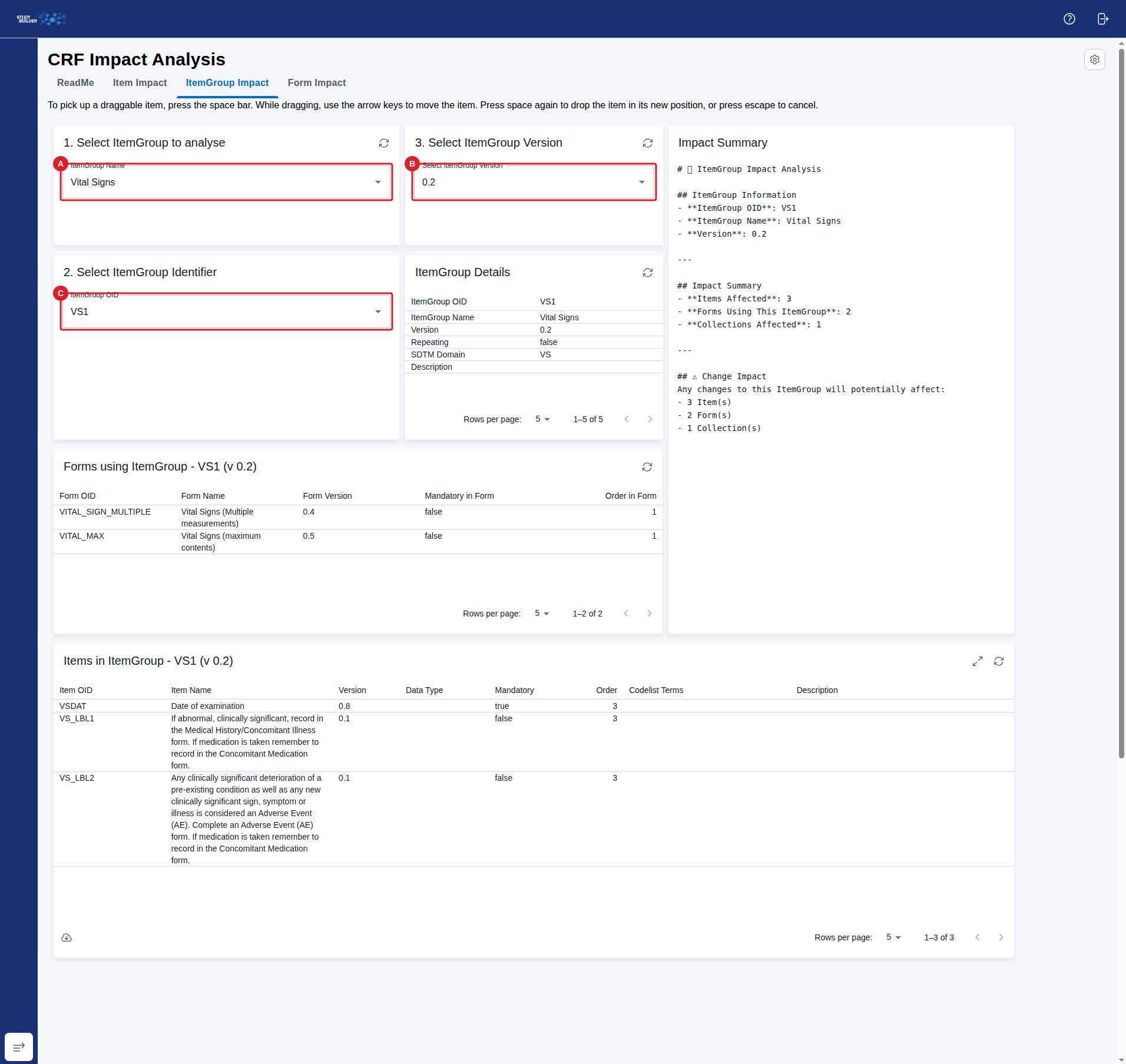
- Select an ItemGroup (name) from the Select an ItemGroup to analyse dropdown (A).
- Since an ItemGroup can be defined with the same name, then Select ItemGroup Identifier (C) to get the identifier (OID) of the ItemGroup to assess
- Select the ItemGroup Version (B) to analyse.
- Review the ItemGroup Details card for the ItemGroup's own properties (for example SDTM domain and whether it repeats).
- Review the Items in ItemGroup card displaying every Item the ItemGroup contains.
- Review the Forms using ItemGroup card displaying every Form that references it.
- Review the Collections using ItemGroup card displaying every Collection where those Forms are used.
- Review the Impact Summary card for a count of affected Items, Forms, and Collections, and a change-impact breakdown.
NOTE
The data displayed depends on the database content — an ItemGroup that is not yet used anywhere will show empty impact cards.
Form Impact
Purpose: Shows every Collection that uses a selected Form, which ItemGroups and Items it contains, and a computed impact summary.
When to use: Use before updating a Form's definition, to see which Collections would be affected, and which ItemGroups and Items belong to it.
Show Quick Guide
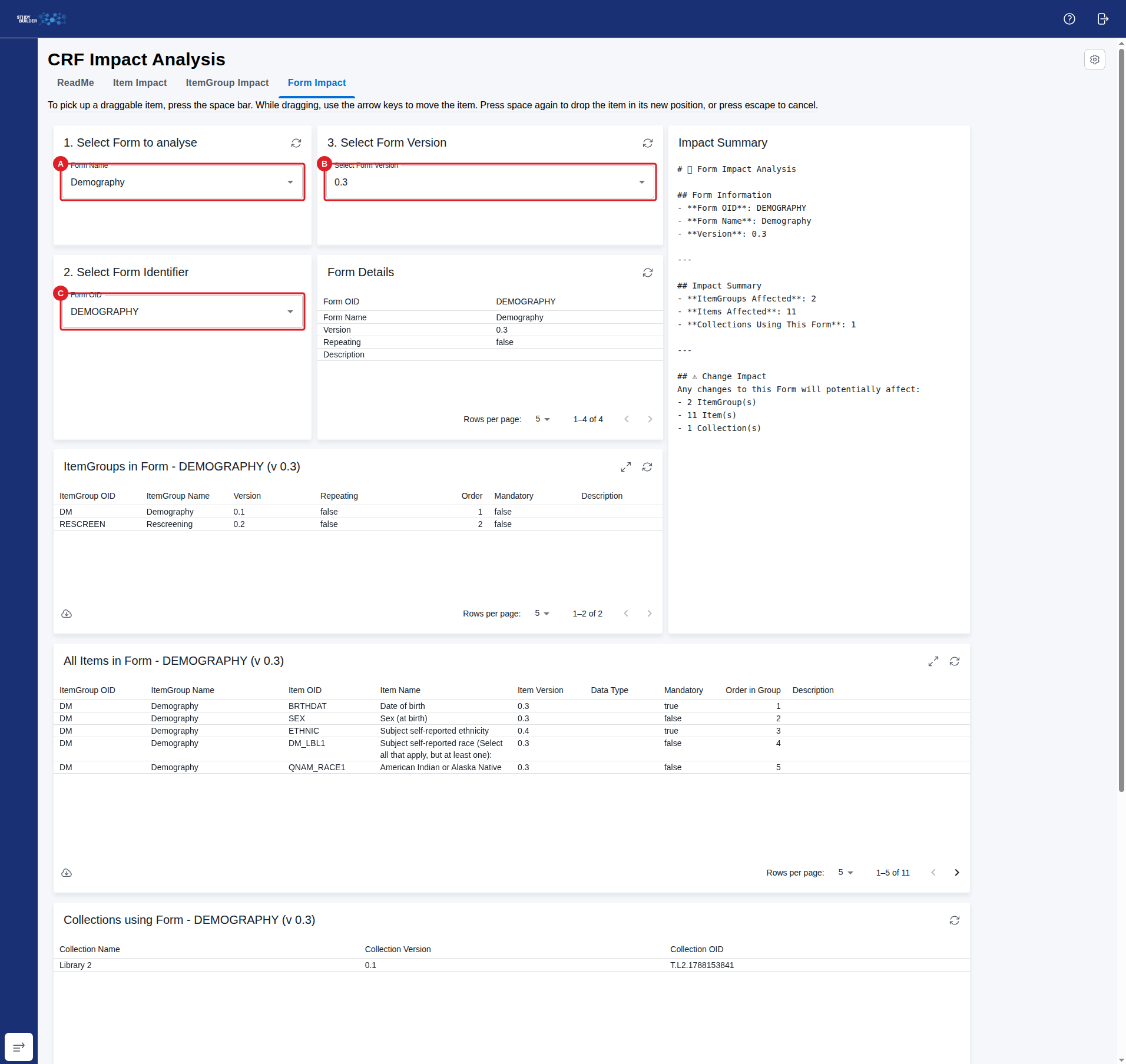
- Select a Form (name) from the Select a Form to analyse dropdown (A).
- Since a Form can be defined with the same name, then Select Form Identifier (C) to get the identifier (OID) of the Form to assess
- Select the Form Version (B) to analyse.
- Review the Form Details card for the Form's own properties (for example whether it repeats).
- Review the ItemGroups in Form card displaying every ItemGroup the Form contains.
- Review the All Items in Form card displaying every Item within those ItemGroups.
- Review the Collections using Form card displaying every Collection where the Form is used.
- Review the Impact Summary card for a count of affected ItemGroups, Items, and Collections, and a change-impact breakdown.
NOTE
The data displayed depends on the database content — a Form that is not yet used anywhere will show empty impact cards.
Show Solution Architecture
Each tab starts from a single selected node in the CRF hierarchy (Item, ItemGroup, or Form) and its version, and walks the containment relationships both upward (to the Forms and Collections that use it) and downward (to the ItemGroups/Items it contains). A final card aggregates the counts from the other cards into an Impact Summary, so the ripple effect of a change is visible without cross-referencing multiple tables by hand. Only the Item Impact tab's summary states an explicit overall impact level (Low, Medium, or High) — the ItemGroup Impact and Form Impact summaries report the affected counts without a computed rating. Only the Item Impact tab renders an explicit dependency chain, since an Item sits at the bottom of the hierarchy and its chain is the only one that spans all four levels (Collection → Form → ItemGroup → Item). Unlike the CRF Library Versions report, this report does not diff two versions of a definition — it traces usage relationships for a single selected version.
Common errors
| Symptom | Interpretation | Likely cause | Fix |
|---|---|---|---|
| The impact cards are empty | Not necessarily an error | The selected Item, ItemGroup, or Form (at the selected version) is not currently used anywhere else in the library | Confirm you selected the correct element and version; an empty result is expected for an unused or not-yet-referenced definition |
If this does not resolve the issue, contact your OpenStudyBuilder administrator.